

Best AI Tools for Small Businesses in 2026
Artificial intelligence is no longer limited to large corporations with expensive technology teams. In 2026, small businesses can use AI to write marketing content, analyze data, answer customer questions, automate repetitive tasks, create professional designs, manage meetings, and improve day-to-day operations.
The biggest advantage is not simply that AI can “do things faster.” The right AI tool can allow a small business to accomplish work that previously required several employees, freelancers, or separate software subscriptions.
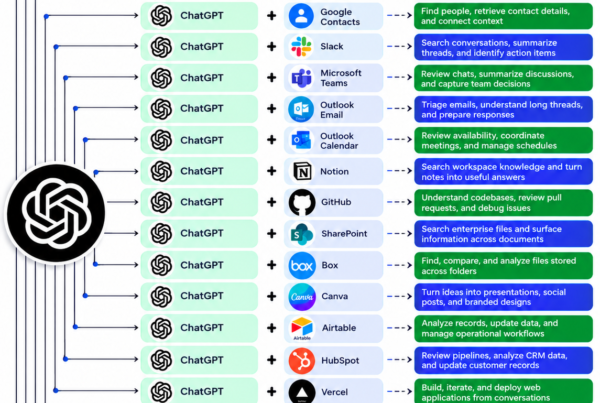
Google, Microsoft, and Anthropic are all expanding AI specifically into the workflows small businesses already use, including email, documents, spreadsheets, CRM, accounting, design, and customer management. �
Google Workspace +2
But there is a problem: there are now thousands of AI tools available. Choosing the wrong ones can leave a business paying for multiple subscriptions without generating meaningful results.
This guide covers some of the best AI tools for small businesses in 2026 and explains what each one is actually useful for.
Quick Comparison: Best AI Tools for Small Businesses
AI Tool
Best For
Ideal Business
ChatGPT
Writing, research, brainstorming and general productivity
Almost any small business
Claude
Long documents, analysis and business writing
Professional services
Google Workspace with Gemini
Email, documents, spreadsheets and productivity
Google-based businesses
Microsoft 365 Copilot
Office productivity and business workflows
Microsoft 365 users
Canva Magic Studio
Graphic design and marketing
Small brands and marketers
HubSpot AI
CRM, sales and customer management
Growing businesses
Zapier
Workflow automation
Businesses with repetitive tasks
QuickBooks with AI features
Accounting and financial management
Small businesses
Notion AI
Knowledge management and documentation
Teams and startups
Fireflies.ai
Meeting transcription and summaries
Sales and service teams
The best choice depends on what problem your business is trying to solve. Buying every tool on this list would usually be unnecessary.
1. ChatGPT — Best All-Purpose AI Tool
ChatGPT is one of the most versatile AI assistants available to small businesses.
A business owner can use it for:
Writing emails
Creating marketing content
Brainstorming business ideas
Creating business plans
Summarizing documents
Researching markets
Creating social-media content
Analyzing spreadsheets and data
Writing and explaining code
Creating customer-service responses
Developing sales scripts
Its biggest advantage is versatility. Instead of purchasing a different AI application for every small task, a business can use one general-purpose assistant for many different workflows.
For example, a restaurant owner could ask ChatGPT to create a week’s social-media calendar, write promotional messages, analyze customer feedback, and prepare responses to common customer questions.
Best for: businesses that want one AI assistant capable of handling many different tasks.
Our verdict: ★★★★★
2. Claude — Best for Documents and Analysis
Claude from Anthropic is another powerful general-purpose AI assistant. Anthropic introduced Claude for Small Business in 2026, with integrations involving tools such as QuickBooks, PayPal, HubSpot, Canva, DocuSign, Google Workspace and Microsoft 365. �
Anthropic
Claude can be particularly useful for businesses dealing with large amounts of written information.
Potential uses include:
Reviewing contracts
Summarizing reports
Analyzing business documents
Writing proposals
Preparing policies
Research
Creating detailed business reports
Reviewing customer feedback
For example, a consulting company could use AI to summarize lengthy client documents before an employee spends time reading the full material.
Best for: consulting firms, agencies, professional services and businesses working heavily with documents.
Our verdict: ★★★★★
3. Google Workspace with Gemini — Best for Google-Based Businesses
If your business already relies on Gmail, Google Docs, Google Sheets, Google Drive and Google Meet, Gemini can be particularly convenient because AI is integrated into the existing Google ecosystem.
Google says Gemini can help small businesses with tasks such as clearing inboxes, analyzing spreadsheet data, creating content and automating workflows. �
Google Workspace
For example, you could use Gemini in Sheets to analyze business expenses and identify major cost drivers without manually building complex formulas.
It can also assist with:
Email drafting
Meeting summaries
Document creation
Spreadsheet analysis
Presentations
Research
Workflow automation
Google has also introduced features such as Business Profile integration and Business notebooks for small businesses in 2026. �
Google Blog
Best for: businesses already using Google Workspace.
Our verdict: ★★★★★
4. Microsoft 365 Copilot — Best for Microsoft Users
For businesses built around Microsoft 365, Copilot can bring AI into familiar applications such as Word, Excel, PowerPoint, Outlook and Teams.
Microsoft positions Copilot for small and medium-sized businesses as a way to help with productivity, customer relationships, branding and business growth. �
Microsoft Adoption
Possible applications include:
Drafting emails in Outlook
Summarizing meetings
Creating presentations
Analyzing Excel data
Drafting documents
Preparing reports
Finding information across business workflows
The major advantage is integration. Employees don’t necessarily need to move information into a separate AI application every time they want assistance.
Best for: businesses already using Microsoft 365.
Our verdict: ★★★★★
5. Canva Magic Studio — Best AI Design Tool
Professional design can be expensive for a small company.
Canva’s AI-powered features can help businesses create:
Social-media graphics
Advertisements
Presentations
Posters
Marketing materials
Videos
Business presentations
Product visuals
This is particularly useful for businesses that cannot afford a full-time graphic designer.
For example, a small clothing company can create promotional graphics for Instagram, Facebook and its website without starting every design from scratch.
The important point is that AI doesn’t eliminate the need for good design judgment. Businesses still need to check branding, spelling, product information and visual consistency.
Best for: small businesses doing their own marketing.
Our verdict: ★★★★★
6. HubSpot AI — Best for CRM and Sales
Customer relationship management becomes increasingly important as a small business grows.
HubSpot combines CRM functionality with AI capabilities that can assist sales, marketing and customer-service workflows. HubSpot’s own 2026 guide highlights AI applications across sales, marketing and support for small businesses. �
HubSpot Blog
Businesses can use AI-powered CRM workflows to help with:
Lead management
Customer communication
Sales follow-ups
Marketing
Customer support
Prospect research
Content creation
Instead of keeping customer information in spreadsheets and trying to remember when to follow up, a CRM can create a more structured sales process.
Best for: businesses with sales teams, leads and recurring customers.
Our verdict: ★★★★½
7. Zapier — Best for Automation
Zapier is particularly valuable when a business repeatedly moves information between different applications.
For example:
New website lead → CRM → email notification → follow-up task
Instead of an employee performing each step manually, automation can connect the systems.
AI features can make these workflows more intelligent by helping classify information, generate responses or determine what action should happen next.
Potential applications include:
Lead management
Email automation
Customer onboarding
Data entry
Notifications
Marketing workflows
Task creation
Internal processes
The important distinction is that automation is most valuable when a task happens repeatedly.
Best for: businesses wasting employee time on repetitive digital tasks.
Our verdict: ★★★★★
8. QuickBooks — Best for Small Business Accounting
Financial management is another area where AI can reduce administrative work.
QuickBooks can help businesses manage areas such as:
Bookkeeping
Invoices
Expenses
Financial reporting
Cash-flow information
Business transactions
AI-powered accounting features can help business owners understand financial information without manually examining every transaction.
However, businesses should be careful about treating AI-generated financial information as automatically correct. Important tax, accounting and compliance decisions should still be reviewed by an appropriately qualified professional.
Best for: small businesses that need better financial organization.
Our verdict: ★★★★½
9. Notion AI — Best for Business Knowledge
Notion can serve as a central location for company information, documentation, project management and internal knowledge.
AI can help employees:
Summarize documents
Find information
Create meeting notes
Draft internal documents
Organize knowledge
Generate project content
This becomes particularly useful when a company grows and information starts becoming scattered across emails, messages, documents and individual employees’ computers.
Best for: startups and teams that need a centralized knowledge base.
Our verdict: ★★★★½
10. Fireflies.ai — Best for Meetings
Meetings can consume a significant amount of time.
AI meeting assistants such as Fireflies.ai can transcribe conversations and produce summaries and action items.
This can be useful for:
Sales meetings
Client consultations
Team meetings
Interviews
Project discussions
Customer calls
Instead of having an employee take detailed notes throughout a meeting, AI can create a record that the team can review afterward.
The key benefit isn’t simply transcription. It is turning conversations into searchable business information and follow-up actions.
Best for: businesses with frequent meetings and client calls.
Our verdict: ★★★★
How Small Businesses Should Choose an AI Tool
The biggest mistake is buying AI software simply because it is popular.
Instead, start with a business problem.
Ask:
1. What takes the most employee time?
If employees spend hours writing emails, an AI writing assistant may help.
2. What happens repeatedly?
If the same information is copied between systems every day, automation could provide a better return.
3. Where are mistakes happening?
AI can assist with repetitive work, but important outputs still require human review.
4. Can the tool integrate with your existing software?
Integration can be more important than having the most sophisticated AI model.
5. What is the return on investment?
Suppose an AI tool costs $30 per month but saves a business five hours of work every month. Depending on the employee’s value and how those hours are used, that could be a very good investment.
The Best AI Stack for a Small Business in 2026
A small business does not need ten AI subscriptions.
For many businesses, a simple stack could be:
General AI: ChatGPT or Claude
Office productivity: Google Workspace with Gemini or Microsoft 365 Copilot
Design: Canva
CRM: HubSpot
Automation: Zapier
Accounting: QuickBooks
The exact combination should depend on the business.
Google’s current small-business guidance similarly emphasizes using AI to automate repetitive work, analyze data and create content rather than simply adopting AI for its own sake. �
Google Workspace +1
Benefits of AI for Small Businesses
When implemented properly, AI can help small companies compete with larger organizations.
Lower operating costs
AI can reduce the amount of manual work required for certain processes.
Faster content production
Businesses can create first drafts of marketing materials, emails and other content much faster.
Better customer service
AI can assist with frequently asked questions and routine customer interactions.
More efficient employees
Employees can spend less time on repetitive administrative work and more time on higher-value activities.
Better decision-making
AI can help identify patterns in business data that might otherwise be difficult to spot.
Easier scaling
A company can potentially increase its output without increasing staff at the same rate.
Risks Small Businesses Should Consider
AI isn’t a magic solution.
Businesses should be careful about:
Incorrect AI-generated information
Privacy and confidential data
Copyright issues
Security
Over-automation
Poor-quality AI-generated content
Dependence on a single platform
Employees should also understand what information they are permitted to enter into an AI system.
Google, for example, highlights privacy and security controls for business use of Gemini within Workspace. �
Google Workspace
The best approach is AI + human oversight, not AI replacing human judgment in every situation.
Final Verdict
The best AI tool for a small business isn’t necessarily the most powerful AI application. It is the tool that solves a specific, expensive or time-consuming business problem.
For most small businesses in 2026, ChatGPT or Claude are excellent starting points for general-purpose work. Gemini or Microsoft 365 Copilot make more sense when the business already relies heavily on Google or Microsoft software. Canva is excellent for marketing design, HubSpot for CRM, Zapier for automation, and QuickBooks for financial management.
The smartest strategy is to start with one problem, one tool and one measurable goal.
If the tool saves time, reduces costs or increases revenue, keep it. If it doesn’t produce measurable value, replace it.
AI isn’t valuable because it is new. It is valuable when it produces a real business result.
SEO information for SochRoom
Suggested SEO title: Best AI Tools for Small Businesses in 2026: 10 Tools to Grow Faster
Meta description: Discover the best AI tools for small businesses in 2026, including ChatGPT, Claude, Gemini, Copilot, Canva, HubSpot, Zapier and QuickBooks.
Primary keyword: best AI tools for small businesses