

A Critical Analysis:
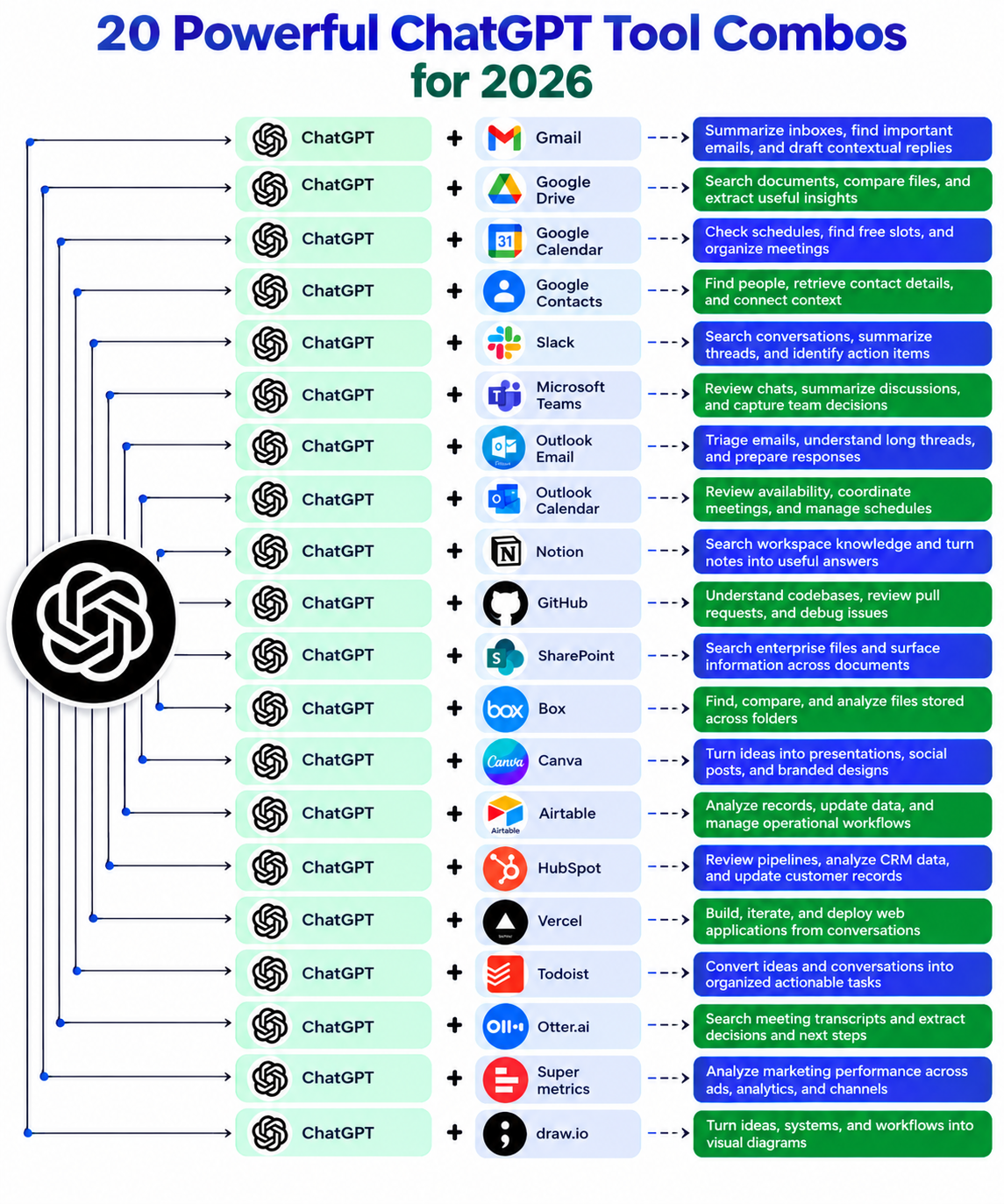
The infographic presents 20 practical combinations of ChatGPT with popular productivity, communication, development, marketing and business applications.
The central idea is simple: ChatGPT becomes significantly more useful when it can work with information stored in the tools people already use. Rather than treating AI as a standalone chatbot, these combinations position it as an intelligent layer for searching, summarizing, analyzing and transforming existing information into actionable results.
Communication and Email Management:
The first combinations connect ChatGPT with Gmail and Outlook Email. Their primary benefit is reducing the time spent processing large inboxes. ChatGPT can potentially summarize lengthy email threads, identify important messages and help prepare contextual responses.
For example, a manager returning from a week-long absence could ask AI to identify the most important client emails and summarize unresolved issues before drafting replies.
Similarly, Google Calendar and Outlook Calendar can help users understand schedules and coordinate meetings. Instead of manually checking multiple appointments, AI could help identify available periods or summarize the day’s commitments.
Files, Documents and Organizational Knowledge:
The infographic includes Google Drive, SharePoint, Box and Notion. These integrations address a major business problem: information is often scattered across hundreds or thousands of documents.
For example, an employee could ask:
“Find the latest sales proposal, compare it with the previous version and identify what changed.”
Instead of opening numerous files individually, an AI-assisted workflow can potentially retrieve relevant information and present the important differences.
Notion is particularly useful for organizations maintaining internal knowledge bases, while SharePoint and Box are more relevant to enterprise document management.
Team Collaboration:
Slack and Microsoft Teams are included for searching conversations, summarizing discussions and identifying action items. This can be particularly valuable because important decisions frequently become buried in lengthy conversations.
For example, after a 100-message project discussion, AI could produce:
Key decisions.
Outstanding questions.
Assigned responsibilities.
Deadlines.
Follow-up actions.
This transforms unstructured communication into an organized project summary.
Programming and Development:
The GitHub + ChatGPT combination targets software developers. AI can help understand unfamiliar codebases, review pull requests, explain errors and assist with debugging.
For instance, a developer joining an existing project could ask AI to explain how a particular function interacts with other components. This can substantially reduce the learning curve.
Vercel + ChatGPT goes a step further by connecting conversational AI with web-development workflows. The infographic suggests using conversations to build and deploy web applications. However, this claim should be interpreted carefully:
AI can accelerate development, but production deployment still requires testing, security review and human oversight.
Business, Marketing and Productivity
HubSpot, Airtable, Todoist and Supermetrics cover CRM, databases, task management and marketing analytics:
For example, ChatGPT combined with HubSpot could analyze customer records and help identify follow-up opportunities.
Airtable could be used to analyze operational records.
Todoist could convert project discussions into actionable tasks.
Supermetrics is particularly relevant to marketers because it can consolidate marketing-performance information.
AI could help answer questions such as:
“Which advertising channel produced the highest return last month, and why?”
Finally, Canva and draw.io extend AI into visual communication. Ideas generated in ChatGPT can be transformed into presentations, branded designs, flowcharts and workflow diagrams.
Critical Perspective:
The infographic is useful, but it should not be interpreted as meaning that every combination automatically provides complete automation. Actual capabilities depend on available integrations, permissions, subscription plans, data access and the specific features supported by each application.
The real value of these combinations is therefore not simply “ChatGPT + another app.” It is the creation of connected workflows in which AI can retrieve information, understand context, generate useful output and help users take action. For businesses, this can reduce repetitive work, improve information accessibility and potentially increase productivity—provided privacy, accuracy, permissions and human verification are properly managed.